
Connections
The OmniBox connectors, the pinout of the eight DMX ports (XLR and RJ45), the XLR daughter boards and the cable to use.
Rear panel
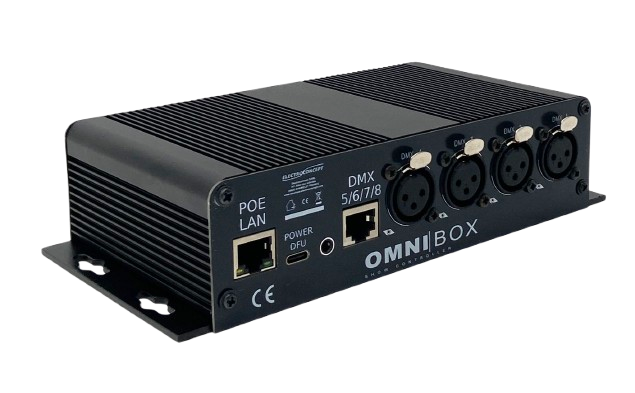
| Marking | Connector | Role |
|---|---|---|
| POE / LAN | RJ45 | Ethernet network. Also powers the device if the switch supplies PoE. |
| POWER | USB-C | Power from the supplied mains adapter, when PoE is not available. |
| DFU | Button | Firmware update. |
| DMX 5/6/7/8 | RJ45 | Universes 5 to 8, grouped on a single connector (pinout). |
| DMX | 4 × 3-pin XLR | Universes 1 to 4, one socket each (pinout). |
DMX ports
Eight opto-isolated ports, one universe each, named P1 to P8 in the interface. Each one works as an output (Physical DMX OUT) or as an input (Physical DMX IN).
| Universes | Connector | Isolation |
|---|---|---|
| DMX 1 to 4 | One female 3-pin XLR socket per universe | Individually isolated, each with its own ground |
| DMX 5 to 8 | A single RJ45 "extension" connector | Isolated from the device and from ports 1 to 4, with a common ground between them: the RJ45 shield |
Because of their common ground, universes 5 to 8 are best kept for fixtures grouped on the same electrical area. For distant equipment or equipment powered from separate sources, prefer XLR 1 to 4.
XLR pinout, universes 1 to 4
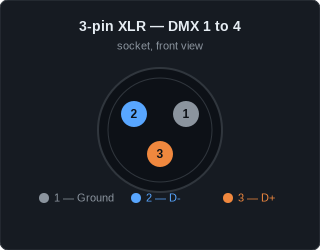
| XLR pin | Signal |
|---|---|
| 1 | Ground (cable shield) |
| 2 | Data− (D−) |
| 3 | Data+ (D+) |
An off-the-shelf DMX cable goes straight from the OmniBox to the fixtures.
RJ45 extension pinout, universes 5 to 8
Each universe uses a pair of consecutive pins: the odd pin carries Data−, the even pin Data+.
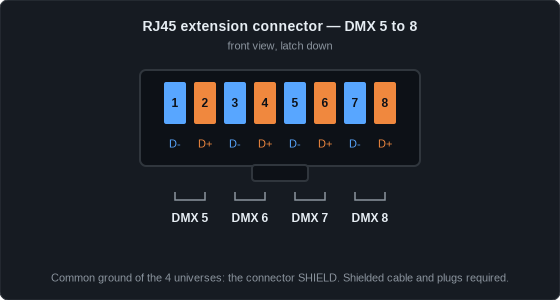
| RJ45 pin | Signal |
|---|---|
| 1 | DMX 5 — Data− |
| 2 | DMX 5 — Data+ |
| 3 | DMX 6 — Data− |
| 4 | DMX 6 — Data+ |
| 5 | DMX 7 — Data− |
| 6 | DMX 7 — Data+ |
| 7 | DMX 8 — Data− |
| 8 | DMX 8 — Data+ |
| Shield | Common ground of universes 5 to 8 |
XLR daughter boards
Two daughter boards fit universes 5 to 8 with 3-pin XLR sockets, with no breakout cable to make. They are sold on the Electroconcept shop (in French).
| Daughter board | DMX 5 | DMX 6 | DMX 7 | DMX 8 |
|---|---|---|---|---|
| Carte fille OmniBox 4 XLR3P OUT | Output | Output | Output | Output |
| Carte fille OmniBox 4 XLR3P OUT 2 XLR3P IN | Output + input | Output + input | Output | Output |
The columns list the sockets provided. With the second board, universes 5 and 6 also have an input socket where a console plugs in directly: place a Physical DMX IN module on port P5 or P6. The other outputs can also be used as inputs with a gender changer (see above).
RJ45 to four XLR breakout
Without a daughter board: a cut shielded RJ45 patch cable, each pair going to a 3-pin female XLR plug. Wire colours for a T568B cable, the most common standard:
| Universe | XLR 1 (ground) | XLR 2 (D−) | XLR 3 (D+) |
|---|---|---|---|
| DMX 5 | Shield | Pin 1 — white-orange | Pin 2 — orange |
| DMX 6 | Shield | Pin 3 — white-green | Pin 4 — blue |
| DMX 7 | Shield | Pin 5 — white-blue | Pin 6 — green |
| DMX 8 | Shield | Pin 7 — white-brown | Pin 8 — brown |
Which cable for the RJ45 extension
Shielded cable and shielded RJ45 plugs are mandatory: the eight pins only carry data, and the shield is the common ground of the four universes. Without it, transmission becomes erratic, especially over long runs and in noisy environments.
| Category | Shielding | Suitable? |
|---|---|---|
| Cat 5e, Cat 6 | Exist unshielded (U/UTP) as well as shielded (F/UTP, S/FTP) | Only if the jacket says shielded |
| Cat 6a | Usually shielded, but U/UTP versions exist | Good choice, after checking the marking |
| Cat 7 and above | Shielded by design (S/FTP) | The safest choice |