
Logic modules
Combining booleans, remembering a state, building a fade or picking the winner among several levels: the three modules of the Logic family in the catalog.
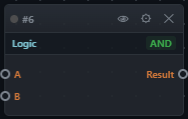
Logic
Logic
A logic gate on two boolean inputs (AND, OR, XOR, NOT), or a flip-flop that remembers a state (RS flip-flop, RS flip-flop (edges), T flip-flop). An unpatched input is 0. The output is 255 (true) or 0 (false).
Ports
| Port | Type | Role |
|---|---|---|
| A · Set · Toggle | Boolean | First input. Its name follows the operation: A for the gates, Set for the two RS flip-flops, Toggle for the T flip-flop. |
| B · Reset | Boolean | Second input: B for the gates, Reset for the flip-flops. Not present in NOT. |
| Result | Boolean | Result of the operation: recomputed continuously for a gate, held between two commands for a flip-flop. |
Settings
| Setting | Values | Effect |
|---|---|---|
| Operation | AND, OR, XOR, NOT, RS flip-flop, RS flip-flop (edges), T flip-flop — default AND | Chooses the gate or the flip-flop (details below). |
The gates
The inputs are read continuously: their state has to be held.
| A | B | AND | OR | XOR | NOT (A only) |
|---|---|---|---|---|---|
| 0 | 0 | 0 | 0 | 0 | 1 |
| 0 | 1 | 0 | 1 | 1 | 1 |
| 1 | 0 | 0 | 1 | 1 | 0 |
| 1 | 1 | 1 | 1 | 0 | 0 |
In NOT, the block has only one input left: switching to NOT removes the connection on input B.
The flip-flops
| Operation | Behaviour |
|---|---|
| RS flip-flop | On level. Set at 1 drives the output to 1, Reset at 1 drives it to 0; with both at 0, it keeps its state. Both at 1: Reset wins. A short pulse is enough to set or clear the state. |
| RS flip-flop (edges) | On rising edge only. The last edge received wins, even if the other input is still at 1: a held Set does not block a Reset, and vice versa. Two edges at the same instant: Reset wins. |
| T flip-flop | Each rising edge on the Toggle input inverts the output. Reset at 1 sets it back to 0 (and holds it there as long as it stays at 1). |
Changing the operation does not create a false edge: the module tracks the level of the inputs whatever operation is selected.
On the block
- Badge: the operation,
AND,OR,XOR,NOT,RS,RS↑(edge-triggered RS flip-flop) orT. - The status light stays grey and the Result dot does not turn green, whatever the result. To follow it, open the monitor (the block's 👁 button).
- Changing the operation renames the inputs (A/B, Set/Reset, Toggle/Reset), except those you have renamed yourself.
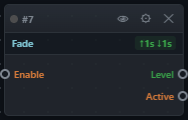
Fade
Logic
Turns a boolean into a ramp: when Enable goes to 1, the level rises to 255; when it goes back to 0, the level falls back to 0. The ramp is linear. A flip in mid-fade starts from the current level, with no jump, and the new ramp then lasts the full set time.
Ports
| Port | Type | Role |
|---|---|---|
| Enable | Boolean | At 1: fade up to 255. At 0: fade down to 0. Unpatched: the level stays at 0. |
| Level | Value | 0-255 level of the ramp, to patch for example into the Master input of a Master dimmer or the Volume input of an Audio player. |
| Active | Boolean | At 1 as long as the level is above 0, including throughout the fade down. Drops back to 0 when the ramp reaches 0. |
Settings
| Setting | Values | Effect |
|---|---|---|
| Fade up time | minutes, seconds, milliseconds (up to 999 min 59 s 999 ms) — default 1 s | Time to go from 0 to 255. |
| Fade down time | same — default 1 s | Time to go from 255 to 0. |
On the block
- Badge: both times, for example
↑1s ↓1s,↑1.5s ↓250ms. - Status light green as long as the level is above 0, grey at 0.
- Level dot green when the level is above 0, Active dot green when the output is 1.
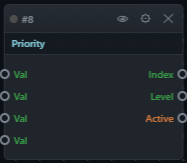
Priority
Logic
Compares several levels and picks the one that wins, giving both its number and its level. Typically: several DMX channels or keys drive a single player, Index chooses the track, Level sets the Master input of a Master dimmer, Active starts playback. An input counts if its level is strictly greater than the threshold.
Ports
| Port | Type | Role |
|---|---|---|
| Val (1 to 32 inputs) | Value | Level of one programme, for example an extracted DMX channel. Unpatched: 0. |
| Index | Value | Number of the winning input (1, 2, 3…), 0 if none is above the threshold. Patch it into the Track input of a player. |
| Level | Value | Level of the winning input, 0 if none. |
| Active | Boolean | At 1 as soon as an input wins (held state). Patch it into the Play/Stop input of a player. |
Settings
| Setting | Values | Effect |
|---|---|---|
| Input count (1-32) | 1 – 32, default 4 | Number of inputs on the block. The three outputs do not change. Reducing the number removes the connections on the inputs taken away. |
| Activation threshold | 0 – 255, default 0 | An input counts when its level is strictly greater than the threshold. 0 = as soon as it leaves zero. |
| Arbitration | Highest value (HTP), Lowest input number, Last changed (LTP) — default Highest value (HTP) | Who wins when several inputs are active (details below). |
The three arbitration modes
- Highest value (HTP): the input with the highest level wins. On a tie, the lowest-numbered input. Crossing two faders gives a natural crossfade between two programmes.
- Lowest input number: fixed priority according to the order of the inputs, whatever their levels. Input 1 comes before 2, 2 before 3, and so on. It is not "the lowest value".
- Last changed (LTP): the input that moved last (changed level while staying above the threshold) wins, even if it is lower than the others. An input dropping below the threshold does not take over. If the winner drops below the threshold, the output goes inactive and stays so until the next movement, without handing over to another input. At startup, with no history, the highest value wins.
On the block
- No badge.
- Status light green when an input wins, grey when all are at rest (normal state, not an error). Its tooltip gives the winner, for example "#2 at 255", or a dash.
- Index and Level dots green when above 0, Active dot green at 1.