
Network modules
The four modules in the Network category bring DMX in and out through the Ethernet socket, over Art-Net or sACN (E1.31). This page describes their ports, their settings and what the block shows.
Common principles
- Receiving (Art-Net IN, sACN IN): the module provides one DMX output per universe received.
- Sending (Art-Net OUT, sACN OUT): the module has one DMX input per universe sent. An input left unconnected simply skips its universe.
- Consecutive universes: one module handles up to 32 universes in a row, starting from the start universe you set. The block adds or removes ports when you change the Universe count.
- Reception is limited to 32 universes in total, Art-Net and sACN combined. Two modules set to the same universe of the same protocol only count once. The status bar, at the bottom of the canvas, shows what is left (
univ 32/32 free). - With no Ethernet link, sending modules send nothing. Sending resumes by itself when the link comes back.
Art-Net or sACN?
| Art-Net | sACN (E1.31) | |
|---|---|---|
| Universe numbers | 0 – 32767 (the first universe is 0) | 1 – 63999 (universe 0 does not exist) |
| Several sources on a received universe | No arbitration: each frame received replaces the previous one. | The source with the highest priority wins. Two sources with the same priority are merged HTP. A source that has been silent for 2.5 s is forgotten. |
| Sending | To an IP address (by default, the network broadcast address). | Automatic multicast or to an IP address, with a priority. |
Art-Net discovery
The OmniBox answers Art-Net discovery requests (ArtPoll): it appears in the node list of your console or software, even with no modules at all. Each universe received by an Art-Net IN module is announced there as an output port of the node.
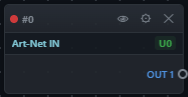
Art-Net IN
Network
Receives Art-Net universes from the network and makes them available to the other modules. Each output delivers the 512 channels of one universe: OUT 1 carries the start universe, OUT 2 the next one, and so on.
Ports
| Port | Type | Role |
|---|---|---|
| OUT 1…32 | DMX | One received universe per output. As many outputs as the Universe count. |
Settings
| Setting | Values | Effect |
|---|---|---|
| Art-Net universe (start) | 0 – 32767, default 0 | Universe carried by OUT 1. |
| Universe count | 1 – 32, default 1 | Number of consecutive universes received, and so of outputs. |
On the block
- Badge:
Ufollowed by the start universe (e.g.U0). - Status indicator: green if all universes are being received, orange if only some are, red if none. On hover, it shows the frame rate (fps) and the start universe.
- A heart-monitor-style trace animates to the left of each universe being received, and the output dot turns green.
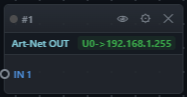
Art-Net OUT
Network
Sends over Art-Net the DMX universes connected to its inputs. Input IN 1 goes out on the start universe, IN 2 on the next one, and so on. All universes go to the same IP address, continuously, at the chosen rate.
Ports
| Port | Type | Role |
|---|---|---|
| IN 1…32 | DMX | One universe to send per input. As many inputs as the Universe count. An unconnected input skips its universe. |
Settings
| Setting | Values | Effect |
|---|---|---|
| Art-Net universe (first) | 0 – 32767, default 0 | Universe sent by IN 1. |
| Universe count | 1 – 32, default 1 | Number of consecutive universes sent, and so of inputs. When you reduce it, the connections of the removed inputs are deleted. |
| Destination IP (unicast) | IPv4 address, default: broadcast address of the network active at creation (e.g. 192.168.1.255) | Address the frames are sent to. Enter the receiver's IP for unicast, or keep the broadcast address to reach the whole network. |
| Output rate (1-44 fps) | 1 – 44, default 40 | Number of frames per second, for each universe. |
On the block
- Badge: start universe and destination (e.g.
U0->192.168.1.255). - Status indicator: grey if no input is connected, green if at least one connected source is active, orange if inputs are connected but no source is active.
- An animated trace next to each input tells you which universe is actually going out.
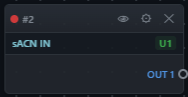
sACN IN
Network
Receives sACN (E1.31) universes and makes them available to the other modules. The module subscribes by itself to the multicast groups of its universes; a source sending unicast to the OmniBox is received too. When several sources send the same universe, the highest priority wins; at equal priority, two sources are merged HTP.
Ports
| Port | Type | Role |
|---|---|---|
| OUT 1…32 | DMX | One received universe per output, starting from the start universe. As many outputs as the Universe count. |
Settings
| Setting | Values | Effect |
|---|---|---|
| sACN universe (start) | 1 – 63999, default 1 | Universe carried by OUT 1. Universe 0 is refused. |
| Universe count | 1 – 32, default 1 | Number of consecutive universes received, and so of outputs. |
On the block
- Badge:
Ufollowed by the start universe (e.g.U1). - Status indicator: green if all universes are being received, orange if only some are, red if none. On hover: frame rate (fps) and start universe.
- Animated trace to the left of each universe being received; the output dot turns green.
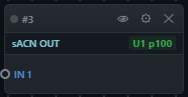
sACN OUT
Network
Sends over sACN (E1.31) the DMX universes connected to its inputs, with the priority you set. In Auto multicast, each universe goes out on its standard multicast group (239.255.x.y, calculated from the universe number); in Unicast, they all go to the IP address you enter.
Ports
| Port | Type | Role |
|---|---|---|
| IN 1…32 | DMX | One universe to send per input, starting from the start universe. An unconnected input skips its universe. |
Settings
| Setting | Values | Effect |
|---|---|---|
| sACN universe (first) | 1 – 63999, default 1 | Universe sent by IN 1. Universe 0 is refused. |
| Universe count | 1 – 32, default 1 | Number of consecutive universes sent, and so of inputs. When you reduce it, the connections of the removed inputs are deleted. |
| Priority (0-200) | 0 – 200, default 100 | sACN priority announced: a receiver keeps the source with the highest priority. The value 0 is not kept: it goes back to 100 at restart. |
| Mode | Unicast (dest. IP) (default) or Auto multicast | Sends to the IP address you enter, or to each universe's multicast group. |
| Destination IP (unicast) | IPv4 address, empty (0.0.0.0) at creation | Used only in Unicast (dest. IP). |
| Output rate (1-44 fps) | 1 – 44, default 40 | Number of frames per second, for each universe. |
On the block
- Badge: start universe and priority (e.g.
U1 p100). - Status indicator: grey if no input is connected, green if at least one connected source is active, orange if inputs are connected but no source is active.
- An animated trace next to each input tells you which universe is actually going out.