
Modules — DMX processing
Modules in the DMX processing family take in DMX universes and send out others: merging two sources, switching to a backup, dimming, smoothing, 16-bit conversion, copying channels and converting for RGBW strips.
Common ground
- Active source. An Art-Net, sACN or physical DMX input is active as long as it has received a frame within the last 3 s. A processing module is active if the source feeding it is: the state travels back along the wires to the actual receiver.
- Output dots. An output dot turns green when the universe it delivers comes from an active source. The input dot it is connected to takes the same colour.
- Status light. The small dot on the left of the block header: grey = nothing patched, green = OK, orange = degraded, red = error. Hover over it to read the state in plain words.
- Multi-universe modules (Master dimmer, Smoothing, RGB -> RGBW). When you change their number of universes or pixels, the block is recreated: it keeps its position, name, group and connections, but gets a new number (
#). If shrinking it would remove connections, a confirmation lists them first.

HTP merge
DMX processing
Merges two DMX universes channel by channel: on each channel, the higher value wins (HTP, Highest Takes Precedence). Both inputs play exactly the same role, their order makes no difference. If only one input is patched, its universe passes straight through.
Example: the console sends 30 % on a channel, the desk 60 %: the output is 60 %. Ideal for stacking two sources without either one overriding the other.
Ports
| Port | Type | Role |
|---|---|---|
| DMX A | DMX | First source to merge. |
| DMX B | DMX | Second source, same role as DMX A. |
| OUT | DMX | Merged universe: each channel at the higher of the two values. |
Settings
None.
On the block
- No badge.
- Status light: green if both sources are active, orange if only one is (or if only one input is patched), red if neither. The tooltip shows the state of each input (
A:●/B:○). - OUT dot green as soon as at least one source is active.

LTP merge
DMX processing
Merges two DMX universes using the rule the latest change wins (LTP, Latest Takes Precedence): the source that has just moved takes over the output, which then holds its values as long as nothing changes. "Moving" means a value has changed, not just that a frame has arrived: a console that keeps resending the same state does not take over.
If both sources change at the same moment, DMX B takes priority. If only one input is patched, its universe passes straight through.
Ports
| Port | Type | Role |
|---|---|---|
| DMX A | DMX | First source. Takes over as soon as it changes, unless B changes at the same moment. |
| DMX B | DMX | Second source, wins on a tie. |
| OUT | DMX | Resulting universe. |
Settings
| Setting | Values | Effect |
|---|---|---|
| LTP mode | Whole universe (LTP frame) (default) or Per channel | Whole universe: as soon as a single channel of a source changes, that source's whole universe goes to the output. Per channel: each channel follows the last source that changed that channel; the other channels do not move. |
On the block
- No badge.
- Status light and OUT dot: same rules as the HTP merge (green = both sources active, orange = only one, red = neither).
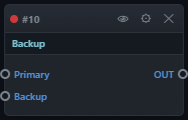
Backup
DMX processing
Switches automatically to a standby source when the main source disappears, then goes back to the main one when it returns. The output always copies just one of the two sources, never a mix.
Ports
| Port | Type | Role |
|---|---|---|
| Primary | DMX | Main source, used as long as it is alive. |
| Backup | DMX | Standby source. |
| OUT | DMX | Copy of the selected source; zero if neither is alive. |
Settings
| Setting | Values | Effect |
|---|---|---|
| Primary revert delay | minutes / seconds / milliseconds, from 1 ms to 999 min 59 s 999 ms, default 2 s | How long the main source must stay present without interruption before the module goes back to it. Prevents flipping back and forth if it keeps dropping out. |
How it decides
- Loss criterion. A source is lost when the receiving module feeding it has received no frame for 3 s. This only works if the input is connected directly to an Art-Net IN, an sACN IN or a Physical DMX IN. An unpatched input counts as lost.
- Switch to backup: immediate, as soon as the main source is lost and the backup is alive.
- Return to the main source: after the Primary revert delay of continuous presence. If the main source drops out during this delay, the countdown starts again from zero.
- Both lost: the output goes to zero. The first source to come back is taken at once, with no delay (the main one first).
- At startup, the module starts on the main source.
On the block
- No badge.
- Status light: green if the main source is active, orange if only the backup source is, red if neither. The tooltip shows
PRIorBAK. - OUT dot green as soon as either source is active.
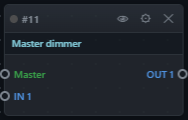
Master dimmer
DMX processing
Grand master: multiplies every channel of one to 32 universes by a shared Master level. Each IN n input feeds the OUT n output with the same number.
Formula: output = input × Master ÷ 255 (rounded down). Master at 255: everything passes; at 128: about half; at 0: blackout. Master unpatched = 255, the module lets everything through.
Ports
| Port | Type | Role |
|---|---|---|
| Master | Value | Overall 0-255 level applied to every universe. |
| IN 1…32 | DMX | Universes to dim. An input left empty gives an output at zero. |
| OUT 1…32 | DMX | Dimmed universe matching the input with the same number. |
Settings
| Setting | Values | Effect |
|---|---|---|
| Universe count | 1 – 32, default 1 | Number of IN / OUT pairs. The block is recreated (see Common ground). |
On the block
- No badge.
- Status light: green if at least one input universe is active, red if DMX inputs are patched but all silent, grey if no DMX input is patched. The Master input is not taken into account.
- Each OUT n dot is green if its IN n input is active.

Smoothing
DMX processing
Softens the changes in one to 32 universes: a console that only sends a few frames per second produces visible steps, and Smoothing replaces them with gradual rises and falls. Each channel reaches its new value gently (exponential curve); the output is refreshed continuously, between received frames.
The softness is set from 0 to 10: 0 = no smoothing (the signal passes untouched), each step adds 40 ms of time constant, i.e. 0.4 s at level 10.
Ports
| Port | Type | Role |
|---|---|---|
| Level | Value | Optional. When patched, it overrides the setting: 0 → level 0, 255 → level 10 (roughly one step every 25). |
| IN 1…32 | DMX | Universes to smooth. Each input feeds the output with the same number. |
| OUT 1…32 | DMX | Smoothed universe. |
Settings
| Setting | Values | Effect |
|---|---|---|
| Universe count | 1 – 32, default 1 | Number of IN / OUT pairs. The block is recreated (see Common ground). |
| Smoothing level (0-10) | 0 – 10, default 0 | Amount of smoothing when the Level input is not patched. At the default, the module smooths nothing: remember to raise it. |
On the block
- No badge.
- Status light and output dots: same rules as the Master dimmer (green = at least one universe active, red = inputs patched but silent, grey = nothing patched; OUT n green if IN n is active).
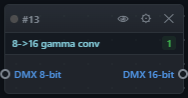
8->16 gamma conv
DMX processing
Turns a range of 8-bit channels into 16-bit channels, with a gamma curve. Each source channel takes two channels on the output (coarse and fine), laid end to end from the chosen start channel. Useful for driving 16-bit devices (fine dimmers, pan/tilt) from an 8-bit source, with a gentler rise at low levels.
Calculation: 16-bit value = 65535 × (input ÷ 255)gamma, with gamma = setting ÷ 100. At 100 the conversion is linear; above, low levels are softened; below, they are lifted.
Ports
| Port | Type | Role |
|---|---|---|
| DMX 8-bit | DMX | Source universe. Only the channels in the set range are read. |
| DMX 16-bit | DMX | Output universe, two channels per source channel. |
Settings
| Setting | Values | Effect |
|---|---|---|
| Start channel (In) | 1 – 512, default 1 | First source channel converted. |
| End channel (In) | 1 – 512, default 1 | Last source channel converted (inclusive). |
| Start channel (Out) | 1 – 511, default 1 | Output channel where the first pair starts. |
| Gamma (x100) | 10 – 400, default 100 (gamma 1.0) | Curve applied: 100 = linear, 220 = gamma 2.2, and so on. |
| 16-bit order | Coarse / Fine (Std) (default) or Fine / Coarse (Inv) | Order of the two channels in a pair: coarse then fine (standard), or the other way round. |
Since each channel takes two, a range of N channels uses 2 × N output channels: at most 256 source channels if the output starts at channel 1. Anything that would go past channel 512 is not written.
On the block
- Badge: the Start channel (In).
- Status light: green if the source is active, red if it is patched but silent, grey if nothing is patched.
- DMX 16-bit dot green when the source is active.
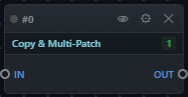
Copy & Multi-Patch
DMX processing
Takes a block of channels from the input universe and copies it one or more times, end to end, from a destination channel. Use it to drive several identical fixtures with the same channels, or to re-patch a range of addresses. Every channel not covered by a copy comes out at zero.
Ports
| Port | Type | Role |
|---|---|---|
| IN | DMX | Source universe. |
| OUT | DMX | Universe holding the copies. |
Settings
| Setting | Values | Effect |
|---|---|---|
| Source start | 1 – 512, default 1 | First channel of the source block. |
| Source end | 1 – 512, default 1 | Last channel of the source block (inclusive). Block length = end − start + 1. |
| Dest. start | 1 – 512, default 1 | Output channel where the first copy starts. |
| Copy count | 1 – 512, default 1 | Number of times the block is laid down. Automatically reduced to the number that fills the universe up to channel 512 (the last copy may be partial). |
| Repeat | 1 – 512, default 1 | Above 1, the module starts again with the next source block of the same length, and lays it down after the previous ones. |
Example: source 1 to 3, Copy count 3, Repeat 3 → channels 1-3 copied three times to output 1-9, then channels 4-6 three times to 10-18, then channels 7-9 three times to 19-27. Anything that would go past channel 512 is ignored.
On the block
- Badge: the Source start.
- Status light: green if the source is active, red if it is patched but silent, grey if nothing is patched.
- OUT dot green when the source is active.
RGB -> RGBW
DMX processing
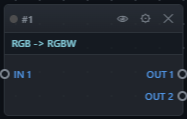
Converts RGB pixels (3 channels) into RGBW pixels (4 channels) for addressable LED strips with a white LED, typically going to the Digital LED output module. The module extracts the white part contained in each colour and hands it to the white LED, taking the actual tint of that LED into account: the perceived colour stays the same.
Pixel layout: on the input, 170 pixels per universe (3 bytes each); on the output, 128 pixels per universe (4 bytes each, in the order R, G, B, W). So there are more outputs than inputs: 170 pixels = 1 input and 2 outputs; 1024 pixels = 7 inputs and 8 outputs. The end of an output universe not taken up by pixels is at zero.
Ports
| Port | Type | Role |
|---|---|---|
| IN 1…7 | DMX | RGB pixels, 170 per universe. The number of inputs follows the Pixel count. |
| OUT 1…8 | DMX | RGBW pixels, 128 per universe, ready for the strip. |
Settings
| Setting | Values | Effect |
|---|---|---|
| Pixel count | 1 – 1024, default 170 | Sets the number of inputs and outputs. The block is recreated (see Common ground). |
| Strip white | Warm white (WW ~3000K) (default), Neutral white (NW ~4000K), Cool white (CW ~6500K), Custom | What is written on the reel. Used to extract the white without shifting the hue. |
| White amount (%) | 0 – 100, default 100 | Share of the extractable white actually moved onto the white LED. 0 = no conversion (W channel off, RGB unchanged). |
| White power (%) | 50 – 200, default 100 | Multiplies the value sent to the W channel (capped at 255). Adjust it if the converted white looks brighter or duller than the original. |
| Custom white — Red / Green / Blue | 0 – 255 each, default 255 | Only used with Custom: R, G, B levels that reproduce the colour of the white LED. Only the proportions matter (the highest is scaled to 255). |
On the block
- No badge.
- Status light: green if at least one input universe is active, red if inputs are patched but silent, grey if nothing is patched.
- Each output dot is green if the input universes supplying its pixels are active.