
Media / API modules
Play back and record DMX sequences on the SD card, play a WAV or MP3 sound, and control the OmniBox over the network from your own software. Media / API family in the catalogue.
Controlling a player or the recorder
The DMX player, the DMX recorder and the Audio player can be controlled in two ways, whichever you prefer:
- By level, through the
Play/Stopinput (Rec/Stopon the recorder): the module runs as long as it is at 1 and stops when it goes back to 0. Ideal with a switch, a time window or the Active output of a Fade. - By pulses, through the
PlayandStopinputs (RecandStop): only the rise to 1 counts. Ideal with a push button or a network command from the API input.
With pulses: Play starts from the beginning, and restarts from the beginning if playback is already running. Stop stops. If both arrive at the same time, Stop wins. A short pulse is not lost, even if it arrives while the module is opening its file.
Files are always read from and written to the root of the SD card: subfolders are not searched.
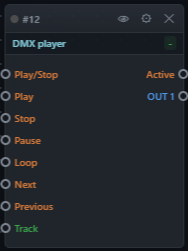
DMX player
Media / API
Plays back a .dmx sequence from the SD card, from 1 to 32 universes, with its original timing. The files come from the DMX recorder. Each universe in the file comes out on a DMX output that you wire to a physical port, Art-Net, sACN or a processing module.
Ports
| Port | Type | Role |
|---|---|---|
| Play/Stop | Boolean | Level. At 1, the sequence plays. At 0, everything stops: the file is closed and the DMX outputs are reset to zero. |
| Play | Boolean | Pulse. Starts the sequence from the beginning; during playback, restarts it from the beginning. Ignored if Play/Stop is wired. |
| Stop | Boolean | Pulse. Stops playback and resets the outputs to zero. Ignored if Play/Stop is wired. |
| Pause | Boolean | Level. Freezes playback as long as it is at 1: the outputs hold their last frame. Back at 0, playback resumes where it left off. |
| Loop | Boolean | Level, read at the end of the file: at 1 the sequence starts again from the beginning, at 0 it stops on its last frame. When wired, it overrides the Mode setting. |
| Next | Boolean | Pulse. Moves to the next file in the playlist; without a playlist, to the next .dmx file in the root. After the last one: back to the first. |
| Previous | Boolean | Pulse. Goes back to the previous file, in the same way (before the first one: back to the last). |
| Track | Value | Selects a file by number (1 = the first). With a playlist: the nth file in the list; a number beyond the list plays nothing and puts the block in error. Without a playlist: the nth .dmx file in the root, and a number higher than the number of files wraps back to the start. Acts when the value changes; 0 changes nothing. |
| Active | Boolean | At 1 while the sequence is running; 0 when stopped, paused, at the end of the file or in error. |
| OUT 1…32 | DMX | One 512-channel universe per output, as many as the Universe count setting. OUT 1 plays back the universe recorded on the recorder's IN 1, OUT 2 the one from IN 2, and so on. |
Settings
| Setting | Values | Effect |
|---|---|---|
| File (.dmx) | List of the .dmx files in the root of the SD card, default — (none) — | File played by Play, and starting point for Next / Previous. A file that was selected and then removed from the card stays displayed, marked (missing). |
| Universe count | 1 – 32, default 1 | Number of OUT outputs. Any further universes in the file are ignored. Changing it rebuilds the block, keeping its position, name, settings and links (except those of removed outputs). |
| Mode | Once (default) · Loop | What happens at the end of the file, if the Loop input is not wired. |
| Playlist (Track input) | .dmx files on the card, in the order you choose; empty by default | Track N plays the Nth file in the list, and Next / Previous step through it. See The playlist. |
The playlist
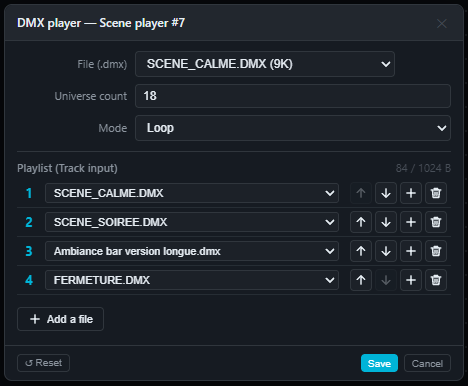
It names the files by their name, in the order you choose: the track number no longer depends on the other files on the card. It is the simplest way to start one sequence per key or per network command.
- The number on the left is the one to send to the
Trackinput. - On each row: ↑ and ↓ move the file, + inserts a row below, the bin removes the row. + Add a file adds a row at the end of the list.
- The list holds 1,024 bytes of names, over 70 names like
SCENE_01.DMX; the gauge at the top right shows the space used. A name is at most 127 characters long. - A file removed from the card stays in the list, marked ⚠ missing; its track puts the block in error.
- Nothing is sent to the unit before Save. The list is saved with the module, in projects and in blocks.
On the block
- Badge: the name of the file actually being played. It follows Next, Previous and Track live. “-” when no file is selected.
- Status light: green when playing, orange when paused, red in error (no file selected, file not found or unreadable), grey when stopped and at the end of the file.
- Output dots:
Activegreen during playback; eachOUTgreen when its universe has received data from the file within the last half-second. - Animated indicator: a blue heart-monitor-style trace on the line of each universe being played. It stays frozen and faded during a pause.
.dmx files in the root, sorted character by character, not as numbers: PROG10.DMX comes before PROG2.DMX, and capitals come before lower case. A file added to the card shifts the numbers. The playlist avoids these surprises.Play.Play/Stop input, you have to take it back to 0 and then to 1 to restart; a pulse on Play restarts straight away.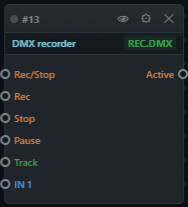
DMX recorder
Media / API
Records 1 to 32 incoming DMX universes to a .dmx file on the SD card, with their timing. The file plays back directly in the DMX player. Connect whatever you want to capture to its IN inputs: Art-Net or sACN reception, a physical DMX input, the output of a processing module.
Ports
| Port | Type | Role |
|---|---|---|
| Rec/Stop | Boolean | Level. At 1, recording starts: the file is rewritten from the beginning. At 0, recording ends and the file is closed cleanly. |
| Rec | Boolean | Pulse. Starts recording. No effect during a recording, so the take is not overwritten; if received while the file is being closed, it waits for that to finish and then starts. Ignored if Rec/Stop is wired. |
| Stop | Boolean | Pulse. Ends the recording and closes the file. Ignored if Rec/Stop is wired. |
| Pause | Boolean | Level. Suspends recording without closing the file. Time freezes too: the pause will not show up on playback. |
| Track | Value | Selects the target file by number: N records to REC<NNN>.DMX, on three digits (5 gives REC005.DMX). 0 changes nothing. Only taken into account while the module is stopped. |
| IN 1…32 | DMX | Universes to capture, one per input, as many as the Universe count setting. An unwired input is not recorded. |
| Active | Boolean | At 1 while actually recording; 0 when stopped, paused or in error. |
Settings
| Setting | Values | Effect |
|---|---|---|
| File (.dmx) | Text, default REC.DMX | Name of the file written to the root of the SD card. It is recreated on every take: the previous recording with the same name is overwritten. |
| Universe count | 1 – 32, default 1 | Number of IN inputs. Changing it rebuilds the block, keeping its position, name, settings and links (except those of removed inputs). |
| Compression | Delta (compressed) (default) · Raw (uncompressed) | Delta only writes the channels that have changed (a full frame when that is shorter). Raw rewrites all 512 channels of each universe that has changed. Either way, the take starts with a full snapshot of all wired universes. |
| Max encoding fps | 1 – 60, default 44 | Maximum number of snapshots recorded per second. Changes that occur within the same interval are grouped under a single instant. |
On the block
- Badge: the name of the file actually targeted, which follows the Track input.
- Status light: green while recording, orange when paused, red in error (file cannot be created, for example with no SD card), grey when stopped.
- Output dot:
Activegreen while recording. - Animated indicator: a red trace with a blinking dot, shown large in the right-hand column, during the take. It stays frozen and faded during a pause.
.dmx: the DMX player only offers and steps through these files. To keep several takes without overwriting them, drive the Track input: REC001.DMX, REC002.DMX… To play them back in the order you want, put them in the player's playlist.Track change received during a recording is not remembered: change the value once the recorder has stopped.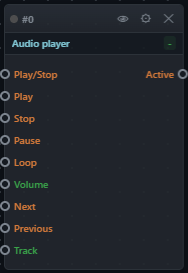
Audio player
Media / API
Plays a WAV or MP3 file from the SD card on the audio output. Accepted formats: 8- or 16-bit PCM WAV, mono or stereo, and MP3. The volume is set through an input, so you can control it live (fader, fade, network command).
Ports
| Port | Type | Role |
|---|---|---|
| Play/Stop | Boolean | Level. Plays the file as long as it is at 1. At 0, the sound is cut and the player is freed for another module. |
| Play | Boolean | Pulse. Starts the track from the beginning; during playback, restarts it from the beginning. Ignored if Play/Stop is wired. |
| Stop | Boolean | Pulse. Cuts the sound and frees the player. Ignored if Play/Stop is wired. |
| Pause | Boolean | Going to 1 pauses (if the sound is playing); going back to 0 resumes at exactly the same point. |
| Loop | Boolean | Level, read at the end of the track: at 1 it starts again, at 0 playback stops. When wired, it overrides the Repeat mode setting. |
| Volume | Value | 0 (silence) to 255 (maximum), applied live. Not wired: 255. |
| Next | Boolean | Pulse. Moves to the next track in the playlist; without a playlist, to the next audio file in the root. After the last one: back to the first. If playback is running, it carries on by itself with the new track. |
| Previous | Boolean | Pulse. Goes back to the previous track, in the same way (before the first one: back to the last), with the same automatic restart. |
| Track | Value | Selects a track by number (1 = the first). With a playlist: the nth track in the list; beyond the list, nothing plays and the block goes into error. Without a playlist: the nth audio file (WAV and MP3 together) in the root. Acts when the value changes; 0 changes nothing. If playback is running, the new track starts by itself. |
| Active | Boolean | At 1 while sound is actually playing; 0 when stopped, paused or in error. |
Settings
| Setting | Values | Effect |
|---|---|---|
| File (SD) | List of the .wav and .mp3 files in the root of the SD card, default — (none) — | Track played by Play, and starting point for Next / Previous. |
| Repeat mode | Play once (default) · Loop | What happens at the end of the track, if the Loop input is not wired. |
| Format | Auto (detect) (default) · WAV · MP3 | Auto recognises the format from the file's content. Force WAV or MP3 if detection fails. |
| Playlist (Track input) | .wav and .mp3 files on the card, in the order you choose; empty by default | Track N plays the Nth track in the list. Works like the DMX player's playlist. |
On the block
- Badge: the name of the track actually being played, which follows Next, Previous and Track. “-” when no file is selected.
- Status light: green when playing, orange when paused, red in error, grey when stopped.
- Output dot:
Activegreen during playback. - Animated indicator: a green loudspeaker with animated sound waves, shown large in the right-hand column, during playback. Frozen and faded during a pause.
- Monitor: the block's Monitor button offers Audio playback (position/state), which shows the position and, in case of error, its cause (file not found, unsupported format, another audio player already playing, SD read error).
Level to Volume and Active to Play/Stop. On activation, the sound starts and rises; on deactivation, it fades down, and the player only stops once the level is back at zero, because Active stays at 1 throughout the fade-out.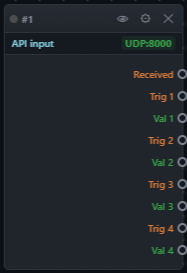
API input
Media / API
Control from your own software: the OmniBox listens on a UDP or TCP port and turns the messages it receives into triggers and values you can wire up. The module is divided into lines (1 to 16): each line recognises one command and produces a Trig pulse and a Val value. Useful for starting a player, setting a level or switching a logic module from show-control software, a PLC or a script.
Ports
Fixed layout: Received first, then one Trig / Val pair per line, giving 1 + 2 × Number of lines outputs (33 at most).
| Port | Type | Role |
|---|---|---|
| Received | Boolean | Pulse on every message that arrives on the port, recognised or not: shows that data is arriving. |
| Trig 1…16 | Boolean | Pulse when the line is recognised (its number, its pattern, or its byte changing). Each message gives a new edge, even if the previous pulse has not finished. |
| Val 1…16 | Value | Value of the line (0 – 255): the number received, the pattern's argument or the byte read. It keeps the last value received; a number above 255 gives 255. |
Settings
| Setting | Values | Effect |
|---|---|---|
| Protocol | UDP (default) · TCP | Listening mode. In UDP, both unicast and broadcast messages are received. |
| Listening port | 0 – 65535, default 8000 (set on creation) | 0 disables the module. Ports used by the product are refused and the block shows an error: 77, 80 (web), 67 and 68 (DHCP), 6454 (Art-Net), 5568 (sACN). |
| Format | Numbered (3=128) (default) · Pattern (PLAY=10) · Binary (bytes) | How messages are read, see below. |
| Number of lines | 1 – 16, default 4 | Each line adds two outputs. Removing lines deletes the links of the removed lines. |
| First number | 1 – 255, default 1 — Numbered format only | Number that targets line 1. With 9, the message 9=… targets line 1, 10=… line 2, and so on. |
| Start byte | 0 – 1471, default 0 — Binary format only | Position in the message of the byte read by line 1 (0 = first byte). |
| Pulse (ms) | 10 – 5000, default 100 | How long Trig and Received stay at 1 after a message. |
| Max TCP clients | 1 – 4, default 2 — TCP only | Simultaneous connections accepted. 4 in total across all API modules. |
| Patterns | One pattern per line, 31 characters — Pattern format only | Command recognised by each line. An empty pattern never responds. |
Message formats
A message can carry several commands, separated by a line break (CR or LF) or by ;. Upper and lower case make no difference.
- Numbered:
number=value, where the separator can be=,:or a space. The number targets a line of the module (counted from the First number), not a DMX channel. A number on its own fires the line without changing its value. A number outside the module's lines is ignored. - Pattern, without
%d: the line responds to the exact word, followed or not by a number. The patternPLAYresponds toPLAY,PLAY=10,PLAY 10orPLAY:10; the number goes toVal. - Pattern with
%d(template): the pattern gives the exact form of the command, with%dmarking where the number goes.PLAY,%dresponds toplay,1, but not toPLAY 1. The whole command must match; a space in the pattern accepts one or more spaces. If several lines respond, the first one wins. - Binary: line 1 reads the byte at position Start byte, line 2 the next one, and so on.
Valtakes the byte's value, andTrigonly fires if that byte has changed. A message that is too short leaves the remaining lines unchanged.
Examples
| Message received | Setting | Effect |
|---|---|---|
3=128 | Numbered, First number 1 | Val 3 goes to 128 and Trig 3 sends a pulse. |
1=255;2=0 | Numbered, First number 1 | Two commands: Val 1 = 255 and Val 2 = 0, each with its Trig pulse. |
vol=200 | Pattern, line 2 = VOL | Val 2 goes to 200 and Trig 2 sends a pulse. Connect Val 2 to the Volume of an Audio player. |
play,1 | Pattern, line 1 = PLAY,%d | Val 1 = 1 and a pulse on Trig 1, to connect to a player's Play. |
On the block
- Badge: protocol and port, for example
UDP:8000. - Status light: green during the
Receivedpulse (a message has just arrived), grey when idle or with port 0, red when the port is refused or there is no room left to open it. - Output dots:
ReceivedandTriggreen during their pulse,Valgreen as long as its value is not zero.