
Modules — Conversions
Modules in the Conversions family turn a signal from one type into another: extract channels from a DMX universe, rebuild a universe from values, turn a value into an ON/OFF state with a threshold, or a state into a level.
The three signal types
Each port on a block carries a single signal type, recognisable by its colour:
| Type | Content | Examples |
|---|---|---|
| DMX | A full universe: 512 channels from 0 to 255. | Output of an Art-Net IN, input of a Physical DMX OUT. |
| Value | A single level from 0 to 255. | A fader, the Master input of the Master dimmer. |
| Boolean | A state: 0 (OFF) or 1 (ON). | A keypad key, the Play/Stop input of the DMX player. |
A wire only connects two ports of the same type. The receiving module reads the signal in the format it expects: a 512-channel universe cannot go into a port that expects a single level, and vice versa. While you drag a wire, compatible inputs are highlighted; dropped on an input of another type, the wire is not created.
To go from one type to another, insert a conversion module:
- DMX → Value: DMX → Val
- Value → DMX: Val → DMX
- Value → Boolean: Val → Bool
- Boolean → Value: Bool → Val
To go from DMX to boolean, chain DMX → Val then Val → Bool.
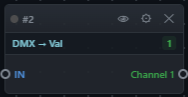
DMX → Val
Conversions
Extracts 1 to 32 consecutive channels from a DMX universe and delivers each one on a 0-255 Value output. The first port reads the DMX address you set, the following ones the next channels. Use it, for example, to have a console fader control an OmniBox module.
Ports
| Port | Type | Role |
|---|---|---|
| IN | DMX | Universe the channels are taken from. |
| Channel 1…32 | Value | Level of the matching channel: Channel 1 = DMX address, Channel 2 = DMX address + 1, and so on. |
Settings
| Setting | Values | Effect |
|---|---|---|
| DMX address | 1 – 512, default 1 | Channel read by the first port. |
| Channel count | 1 – 32, default 1 | Number of channels extracted, and therefore of outputs on the block. Channels beyond 512 are not read. |
On the block
- Badge: the DMX address.
- Status light: green if the DMX source is active, red if it is patched but silent, grey if nothing is patched.
- All outputs turn green when the source is active.
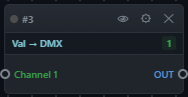
Val → DMX
Conversions
Builds a DMX universe from 1 to 32 Value inputs: each input fills one channel, starting at the Start DMX address. All other channels in the universe are 0. Use it, for example, to send faders, a Fade ramp or the output of a Bool → Val to a DMX output.
Ports
| Port | Type | Role |
|---|---|---|
| Channel 1…32 | Value | Level placed in the matching channel: Channel 1 = Start DMX address, Channel 2 = the next one, and so on. An unpatched input sends 0. |
| OUT | DMX | Full 512-channel universe. |
Settings
| Setting | Values | Effect |
|---|---|---|
| Start DMX address | 1 – 512, default 1 | Channel filled by the first input. |
| Value count (1-32) | 1 – 32, default 1 | Number of inputs on the block. Inputs that would land beyond channel 512 are ignored. |
On the block
- Badge: the Start DMX address.
- Status light and OUT dot: green as soon as at least one input is patched, grey otherwise. They do not tell you whether the values are moving.
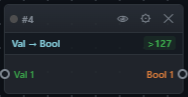
Val → Bool
Conversions
Compares 1 to 32 values against a shared threshold: each output goes to 1 as long as its value is strictly greater than the threshold, and returns to 0 as soon as it falls back to or below it. It is a held state, not a pulse. Each input / output pair is independent of the others.
Ports
| Port | Type | Role |
|---|---|---|
| Val 1…32 | Value | 0-255 value compared against the threshold. Unpatched, it counts as 0. |
| Bool 1…32 | Boolean | 1 if the value with the same number is above the threshold, 0 otherwise. |
Settings
| Setting | Values | Effect |
|---|---|---|
| Conversion count (1-32) | 1 – 32, default 1 | Number of Val / Bool pairs on the block. |
| Threshold (>N → 1) | 0 – 255, default 127 | The output is 1 when the value is greater than N. At the default, it switches from 128 upwards, half of the travel. |
On the block
- Badge: the threshold, preceded by
>(for example>127). - Status light: green as soon as at least one input is patched, grey otherwise.
- Each output dot is green when its output is 1.
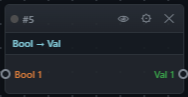
Bool → Val
Conversions
Turns 1 to 32 ON/OFF states into levels: each output takes the High level when its input is 1, and the Low level when it is 0. The output follows the input at all times, with no memory and no latching. Use it, for example, to turn a keypad key into a DMX level, via a Val → DMX.
Ports
| Port | Type | Role |
|---|---|---|
| Bool 1…32 | Boolean | State to convert. Unpatched, it counts as 0. |
| Val 1…32 | Value | High or Low level depending on the input with the same number. |
Settings
| Setting | Values | Effect |
|---|---|---|
| Conversion count (1-32) | 1 – 32, default 1 | Number of Bool / Val pairs on the block. |
| Output if BOOL=0 (0-255) | 0 – 255, default 0 | Low level, sent when the input is 0 (or unpatched). |
| Output if BOOL=1 (0-255) | 0 – 255, default 255 | High level, sent when the input is 1. |
On the block
- No badge.
- Status light: green as soon as at least one input is patched, grey otherwise.
- Each output dot is green when its level is not zero: with a Low level other than 0, it stays green even with the input at 0.